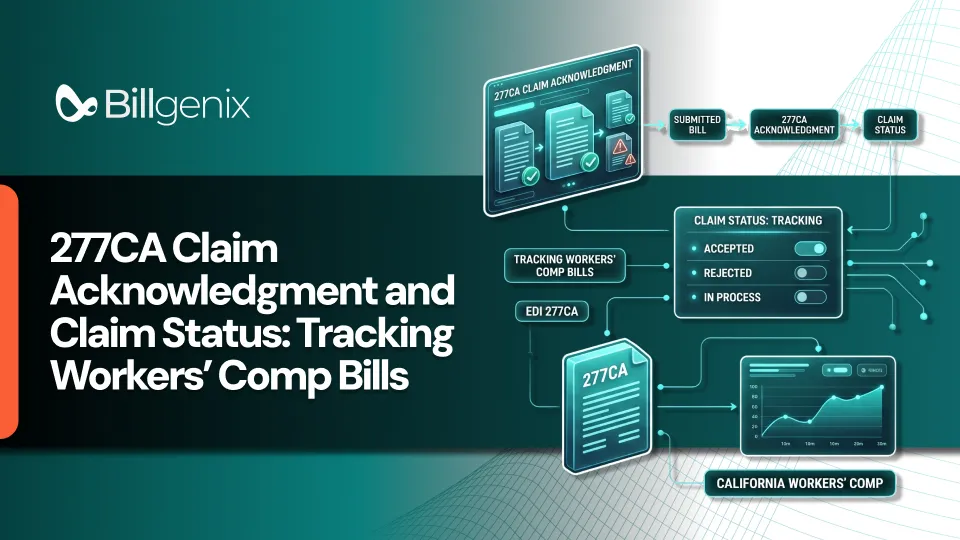
A 277CA claim acknowledgment is an electronic response that tells you whether a payer or claims administrator received your claim and accepted it for further processing. It works at the claim level, which means it speaks about individual bills, not just the file they arrived in. It does not tell you the bill has been approved or paid.
That distinction matters in workers' compensation electronic billing, where one missed response can leave a bill sitting unnoticed for weeks. A typical submission moves from an 837 claim, to a 999 implementation acknowledgment, to a 277CA, then to claim-status follow-up when needed and finally to an 835 remittance advice.
Each step answers a different question. Billing teams that understand the difference spend less time guessing and more time fixing real problems. This guide explains how the claim acknowledgment process works, how to read a response, how to troubleshoot rejections, and how to build dependable workers' comp claim tracking habits.
What Is a 277CA Claim Acknowledgment?
A 277CA is a health care claim acknowledgment. In plain language, it is the payer's way of saying "we received your claim and here is what happened when we ran our first checks." It reports claim-level processing results according to the applicable implementation guide and the payer's own edits. Payers do not all work the same way, so workflows and turnaround times vary.
What the 277CA tells a medical billing team
It tells you whether each claim was accepted for further processing or rejected before adjudication. When a claim is rejected, the response usually includes information about why, so your team can correct the problem. This is where 277CA rejection codes come into play and we cover them below.
When the acknowledgment is generated
The 277CA is generated after the payer or clearinghouse receives and reviews the 837 claim. The exact timing depends on the payer, the clearinghouse, the jurisdiction and the submission channel. Check your trading partner's guidance instead of assuming a fixed timeline.
Accepted, rejected and other acknowledgment outcomes
An accepted claim has passed the initial acknowledgment step. A rejected claim did not and it needs to be fixed and resubmitted according to the payer's instructions. Some responses may report other outcomes depending on the implementation. In every case, acceptance means the claim moved forward, not that it was approved.
277CA vs. 999 vs. 276/277 vs. 835
The most common confusion in electronic billing comes from mixing up these four transactions. The table below shows what each one is for and what it does not prove. Searches for 277CA vs. 999 and 277CA vs. 835 usually come from this exact confusion.
Transaction | Main purpose | What it does not prove |
999 | Reports implementation-level syntax and compliance results for a transaction or functional group | That each claim is accepted for adjudication |
277CA | Reports claim acknowledgment and pre-adjudication results | That a claim has been paid |
276/277 | Requests and returns claim-status information | That payment has been issued |
835 | Reports claim payment and remittance details | That every billed amount was paid in full |
Validate transaction terminology and workflow against the applicable X12 implementation guide, the payer's companion guide, and the workers' compensation jurisdiction. For a deeper look at the earlier step, see our guide to the 999 implementation acknowledgment.
One more point of clarity. The 277CA is not the same as the 276/277 claim-status request and response. The 277CA arrives as an acknowledgment of a claim you submitted. The 276/277 is a question you ask and an answer you receive when you want an update. Treating them as one thing leads to missed follow-ups.
How the Workers' Comp Electronic Billing Workflow Works
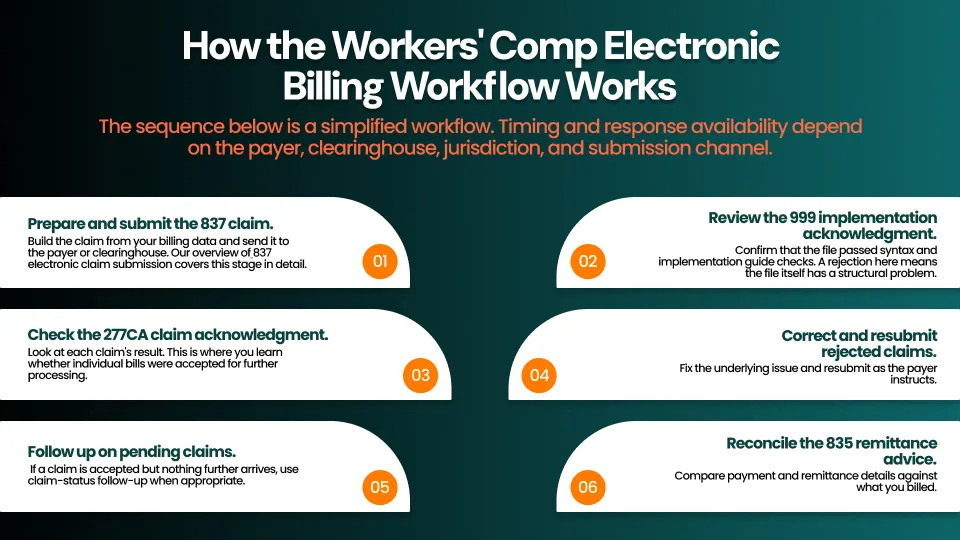
The sequence below is a simplified workflow. Timing and response availability depend on the payer, clearinghouse, jurisdiction, and submission channel.
Workflow at a glance: 837 claim, then 999 acknowledgment, then 277CA response, then status follow-up where needed, then 835 remittance.
- Prepare and submit the 837 claim. Build the claim from your billing data and send it to the payer or clearinghouse. Our overview of 837 electronic claim submission covers this stage in detail.
- Review the 999 implementation acknowledgment. Confirm that the file passed syntax and implementation guide checks. A rejection here means the file itself has a structural problem.
- Check the 277CA claim acknowledgment. Look at each claim's result. This is where you learn whether individual bills were accepted for further processing.
- Correct and resubmit rejected claims. Fix the underlying issue and resubmit as the payer instructs.
- Follow up on pending claims. If a claim is accepted but nothing further arrives, use claim-status follow-up when appropriate.
- Reconcile the 835 remittance advice. Compare payment and remittance details against what you billed.
How to Read a 277CA Report
A 277CA can look dense at first. Work through it in the same order each time and it becomes routine.
Locate the relevant claim and service information
Start by finding the claim you care about. Look for the patient or claim identifier, the billing provider, the date of service and the billed amount. These details help you match the response to the bill.
Identify the claim acknowledgment status
Next, find the overall result for that claim. Was it accepted for further processing, or was it rejected? This status tells you whether you need to act.
Review status category codes, status codes, and any accompanying explanations
The response typically includes status category codes and status codes, sometimes with a short explanation. Read the explanation first, then verify the code against the applicable code set and the payer's companion guide. Do not assume a code means the same thing for every payer.
Match the response to the original claim submission
Use your own claim identifiers and submission records to tie the response back to what you sent. If you cannot match it, that is a signal to investigate before doing anything else.
Illustrative example (simplified):
Item | Example entry |
Claim identifier | Your internal claim number |
Billing provider | Practice name and identifier |
Date of service | A single date |
Acknowledgment status | Rejected |
Explanation | A short statement describing the problem |
This example is for illustration only and does not reflect any specific payer's format or code meanings.
Common 277CA Rejections and How to Troubleshoot Them
Effective claim rejection troubleshooting follows the same pattern every time: read the response, confirm the source data, correct the cause, resubmit according to the payer's instructions and watch for the next response. The categories below are common, but your payer's rules decide the details.
Missing or invalid patient or subscriber information
Check names, dates of birth and identifiers against the source record. Small mismatches such as a misspelled name or a transposed digit can cause a rejection. Correct the registration data, not just the claim.
Provider identifier or billing-provider data discrepancies
Confirm that the billing provider's name, address and identifiers match what the payer has on file. A discrepancy between your records and the payer's records often shows up here.
Invalid claim or service-line data
Review each service line for formatting problems, invalid dates or missing values. A single bad line can affect the whole claim.
Diagnosis, procedure, or required claim information errors
Verify that diagnosis and procedure information is complete, valid and consistent with the service billed. Check the payer's guidance for what must be included.
Workers' compensation claim or injury details that fail payer-specific edits
Workers' compensation bills often depend on claim and injury details such as the claim number, date of injury and employer information. Confirm these against the claims administrator's records, because payer-specific edits vary.
Syntax or implementation errors reported earlier in the acknowledgment process
Sometimes a problem traces back to the file structure and appears at the 999 stage first. If you see structural errors, return to the 999 response and correct the mapping or data issue there.
How to Track Workers' Comp Bills After a 277CA Response
Good workers' comp claim tracking does not end when the 277CA arrives. It continues until the claim is finalized and reconciled.
Maintain a claim-level tracking log
Keep a log with one row per claim. At a minimum, record these fields:
- Original submission date
- Payer or claims administrator
- Claim identifier
- Acknowledgment date
- Response status
- Rejection reason
- Correction date
- Follow-up date
- Final outcome
Identify claims that have no acknowledgment
A claim with no acknowledgment is a claim you cannot yet trust. Compare your list of submitted claims against the responses you received and investigate any gaps.
Use the 276/277 workflow when claim-status follow-up is appropriate
When a claim has been accepted but you need an update, the 276/277 claim-status request and response is the appropriate tool. Use 277CA claim status information to know where a claim stands and use the 276/277 workflow to ask for a fresh update. Together they make up electronic claim status follow-up.
Track pending, denied, and finalized outcomes
Mark each claim as pending, denied or finalized so that nothing falls between categories. Denied claims need their own follow-up path.
Reconcile final results against the 835
When the 835 remittance advice arrives, compare it to what you billed. Remember that an 835 shows payment and remittance details and that not every billed amount is necessarily paid in full.
Workers' Compensation Claim Tracking Best Practices
The habits below keep a billing operation steady. Always follow payer-specific requirements and the applicable state rules instead of adopting one universal deadline or resubmission policy.
Set up daily acknowledgment review
Review new acknowledgments every working day. Early review shortens the time between a rejection and its correction.
Prioritize unresolved rejections
Work rejections before routine follow-ups, since a rejected claim is not moving forward at all. Sort by age so older items are not forgotten.
Avoid duplicate submissions
Before resubmitting, confirm that the original claim is truly rejected. Sending a duplicate of a claim that is still in process can create confusion and extra work.
Document corrections and follow-ups
Note what was wrong, what you changed, and when you resubmitted. That record helps the next person who touches the claim.
Use reporting to identify recurring errors
If the same problem keeps appearing, the cause is usually upstream, such as a registration habit or a mapping issue. Reporting helps you find the pattern and fix it once.
How Workers' Comp Billing Software Can Improve Claim Visibility
Manual tracking works until volume grows. Then spreadsheets, inboxes, and portals become hard to manage. The right workers' comp billing software features can help your team see more with less effort. If your goal is to automate claim tracking, start by identifying which steps are most manual today.
Centralize acknowledgment and rejection information
When acknowledgments and rejection details sit alongside claim information, staff do not need to switch between systems to understand a claim's status.
Make follow-up priorities easier to identify
A clear view of pending claims, unresolved rejections, and follow-up dates makes it easier to decide what to work first.
Reduce manual status tracking
Less time spent copying statuses into spreadsheets means more time spent resolving issues. Support for electronic claim submission and tracking can help move work in that direction.
Improve operational reporting
Reporting on rejection reasons, response times, and outcomes helps managers see where the workflow slows down and where training or process changes could help.
A good workers' compensation billing software platform supports your team's process. It does not replace careful review, and it cannot guarantee that every claim will be accepted.
What About California Workers' Compensation?
For California, providers who choose electronic billing must be able to receive electronic responses, including acknowledgments and electronic remittance advice. Applicable requirements and companion guides come from the California Division of Workers' Compensation (DWC), so use the DWC's electronic billing resources as your reference. Do not treat a general payer timeline as a California deadline. For a broader look at the state's process, see our guide to California workers' compensation billing.
Frequently Asked Questions
What is a 277CA claim acknowledgment?
It is an electronic response that reports whether a claim was received and accepted for further processing. It works at the claim level and does not confirm approval or payment.
What is the difference between a 277CA and a 999?
The 999 reports implementation-level syntax and compliance results for a file or transaction. The 277CA reports claim-level acknowledgment results. A file can pass the 999 and still have individual claims rejected at the 277CA stage.
Does a 277CA acceptance mean the workers' comp bill is approved?
No. Acceptance means the claim moved forward to further processing. Adjudication happens afterward, and a claim can still encounter issues later.
What should I do if a 277CA reports a rejected claim?
Read the explanation, verify the source data, correct the underlying issue, and resubmit according to the payer's instructions. Then watch for the next response.
What is the difference between 277CA and a 276/277 claim-status response?
The 277CA is an acknowledgment of a claim you submitted. The 276/277 is a request you send and a response you receive when you want claim-status information.
How can I track a workers' comp bill that has no acknowledgment?
Compare your submitted claims against the responses you have received, then contact the payer or clearinghouse to confirm receipt. Use the 276/277 workflow when claim-status follow-up is appropriate.
Does a 277CA confirm that payment has been issued?
No. Payment and remittance details are reported on the 835 remittance advice, not on the 277CA.
How do I track California workers' compensation electronic bills?
Keep a claim-level log, review acknowledgments regularly, follow up on claims without responses, and reconcile the 835. Refer to the California DWC's electronic billing guidance for state-specific requirements.
Get Better Visibility Into Your Workers' Comp Billing Workflow
Spend less time manually reviewing claim acknowledgments and organizing follow-ups. Explore how BillGenix can support your workers' compensation billing workflow, from submission through follow-up.