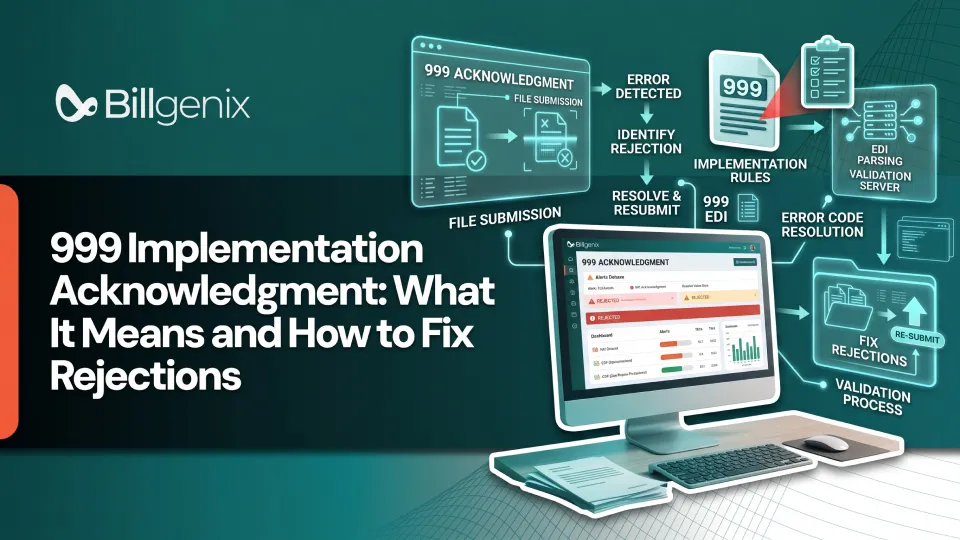
A 999 implementation acknowledgment is an electronic response that tells the sender whether an X12 file passed syntax and implementation guide checks. If you are asking what is a 999 acknowledgment, think of it as a technical receipt. It confirms that the receiver could read your file and that the file followed the required structure. It does not say the claim has been approved or will be paid.
That difference trips up many billing teams. A file can pass the 999 and still be denied later, and a file can fail the 999 before any person at the payer ever sees the claim. This guide explains what the 999 reports, how to read it, and how to fix rejections without guessing. If your team handles workers' compensation billing software workflows, the same principles apply there, with a few California specific points covered below.
What Is a 999 Implementation Acknowledgment?
What the X12 999 transaction does
The 999 is an X12 transaction that reports the results of validating another X12 transaction. The receiving system checks the incoming file against the standard and the applicable implementation guide. Then it sends back a 999 listing what it accepted, what it rejected, and where the problems were found.
Why healthcare billing systems generate 999 acknowledgments
Payers and clearinghouses process enormous volumes of files. They need a fast, automated way to catch structural problems before a claim enters their processing queues. The 999 gives that early feedback so senders can fix a bad file quickly instead of waiting weeks for a missing payment.
How a 999 relates to an 837 claim submission
When you send an 837 claim file, the receiver typically answers with a 999 for that submission. If your 837 claim rejected by 999 is the problem in front of you, the issue is almost always in how the file was built, not in the medical or billing decision behind the claim.
What a 999 does not confirm about claim payment
The 999 reports syntax and implementation guide validation results only. It does not independently establish final claim approval, coverage, medical necessity or payment. Those decisions come later in the process.
How the 999 Acknowledgment Fits Into the EDI Billing Workflow
The exact order of responses depends on the payer, the clearinghouse, the transaction version in use, and the trading partner requirements you have agreed to. Always confirm the sequence with your trading partner. In general, the workflow looks like this.
Prepare and submit an 837 transaction
Your billing system builds the 837 from claim data, wraps it in the required envelope segments and sends it to the payer or clearinghouse.
Review the TA1 acknowledgment when applicable
A TA1 reports on the outer interchange envelope. It is not returned in every setup, but when it appears and shows a problem, the file did not get far enough for deeper checks.
Interpret the 999 implementation acknowledgment
Once the envelope is accepted, the 999 reports on the functional groups and transaction sets inside it. This is where you learn whether the structure and content rules were met.
Review subsequent claim-level responses, such as a 277CA
A 277CA is a claim acknowledgment that speaks to individual claims. It comes from a different stage of review than the 999.
Track adjudication and payment through applicable responses
After claim-level acceptance, the claim moves toward adjudication. Payment and denial information arrives in later responses, such as an 835 remittance advice.
How to Read a 999 EDI Acknowledgment
Learning how to read a 999 EDI file gets easier once you know a handful of segments. The meanings below are explained in plain English. Before publishing internal training material or building automation, verify every segment definition against the applicable X12 implementation guide.
Understanding AK1 and AK2
AK1 identifies the functional group being acknowledged. AK2 identifies an individual transaction set inside that group. Together they tell you which part of your submission the response is talking about.
Understanding IK3 and IK4 error details
IK3 points to a segment-level problem, such as a segment that is missing, out of order, or not allowed in that position. IK4 narrows things down to an element within that segment. These segments appear only when there is an error to report.
Understanding IK5 transaction-set status
IK5 reports the status of one transaction set. It tells you whether that transaction set was accepted, accepted with errors, or rejected.
Understanding AK9 functional-group status
AK9 reports the status of the whole functional group and includes counts of transaction sets received and accepted. When you search for guidance on IK5 and AK9 status codes, remember that they describe two different levels of your file.
Connecting acknowledgment errors to the original submission
Use the control numbers in the acknowledgment to match each response to the file you sent. Then use the segment position information to find the exact spot in your original file.
Segment | What it tells you |
IK5 | Status of an individual transaction set |
AK9 | Status of the functional group |
IK3 | Segment-level syntax or implementation error, when applicable |
IK4 | Element-level error, when applicable |
This table is a simplified illustration. Always read the full acknowledgment and your trading partner's implementation guide. A functional-group status and a transaction-set status can differ so inspect both instead of relying on one field.
Common 999 Rejection Errors and Their Causes
Most 999 acknowledgment errors fall into a few patterns. The examples below describe typical situations. Rejection rules are not identical across payers, so use them as a starting point and not as a complete list.
Missing required data elements
A required element is blank or the segment that should carry it was never written. This often happens when a field is optional in your practice management system but required by the implementation guide.
Invalid data formats or element values
An element has the wrong length, the wrong data type, or a date or number in the wrong layout. A text character in a numeric field is a common illustration.
Incorrect segment structure or order
Segments must appear in the order the guide specifies, and loops must be structured correctly. A mapping change that shifts segment order can trigger this kind of rejection.
Invalid code values or implementation-guide violations
A code is used that is not valid for that element, or a rule from the implementation guide is not followed. This is where reading 999 EDI rejection codes alongside the guide matters most, because the meaning of a code depends on the element it appears in.
Segment count and control-number inconsistencies
Trailer segments carry counts and control numbers that must match the data they close out. If a file was edited by hand, or if a system generated the trailer incorrectly, the counts will not agree and the file will be rejected.
Multiple errors within one transaction file
One file can contain several problems at once. Fixing the first error you find and resubmitting can simply produce a second rejection, so review the entire acknowledgment before changing anything.
How to Fix a Rejected 999 Acknowledgment Step by Step
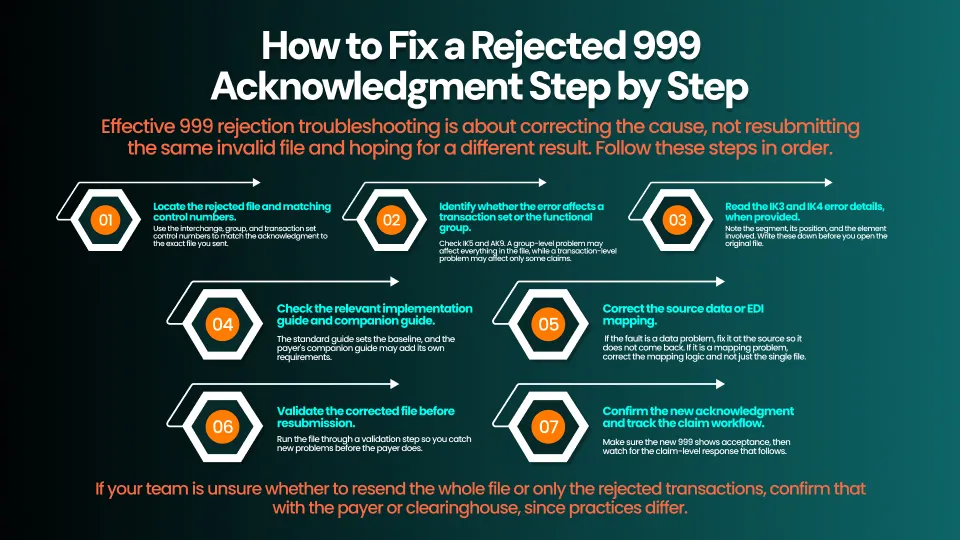
Effective 999 rejection troubleshooting is about correcting the cause, not resubmitting the same invalid file and hoping for a different result. Follow these steps in order.
- Locate the rejected file and matching control numbers. Use the interchange, group, and transaction set control numbers to match the acknowledgment to the exact file you sent.
- Identify whether the error affects a transaction set or the functional group. Check IK5 and AK9. A group-level problem may affect everything in the file, while a transaction-level problem may affect only some claims.
- Read the IK3 and IK4 error details, when provided. Note the segment, its position, and the element involved. Write these down before you open the original file.
- Check the relevant implementation guide and companion guide. The standard guide sets the baseline, and the payer's companion guide may add its own requirements.
- Correct the source data or EDI mapping. If the fault is a data problem, fix it at the source so it does not come back. If it is a mapping problem, correct the mapping logic and not just the single file.
- Validate the corrected file before resubmission. Run the file through a validation step so you catch new problems before the payer does.
- Confirm the new acknowledgment and track the claim workflow. Make sure the new 999 shows acceptance, then watch for the claim-level response that follows.
If your team is unsure whether to resend the whole file or only the rejected transactions, confirm that with the payer or clearinghouse, since practices differ.
999 vs. TA1 vs. 277CA: What Is the Difference?
These three acknowledgments sit at different stages and answer different questions.
Acknowledgment | What it checks | What it tells you |
TA1 | Interchange envelope | Whether the outer envelope could be processed |
999 | Transaction syntax and implementation guide compliance | Whether the file's structure and content rules were met |
277CA | Claim-level receipt | Whether individual claims were accepted for further processing |
TA1 interchange acknowledgment
The TA1 looks at the envelope, which is the wrapper around your data. If the envelope is faulty, the receiver may not be able to read the contents at all.
999 implementation acknowledgment
The 999 looks inside the envelope at the groups and transaction sets. It checks structure, required elements and implementation guide rules.
277CA claim acknowledgment
The 277CA speaks about individual claims. It can report that a claim was accepted or rejected for reasons tied to claim content and payer business rules.
Why a successful 999 does not guarantee claim acceptance for adjudication
A clean 999 means the file was well formed. It does not mean each claim passed the payer's business edits. A claim can still be turned away at the 277CA stage or denied later during adjudication.
What Does a 999 Acknowledgment Mean in California Workers' Compensation?
California has its own electronic billing rules, and billing teams should be careful not to blur them with general medical billing assumptions.
Electronic medical bill submission in California
California allows medical bills for workers' compensation to be submitted electronically under rules published by the Division of Workers' Compensation (DWC). Teams that use workers' compensation EDI software still need to follow those rules and the claims administrator's requirements.
Applicable DWC EDI guidance and trading-partner rules
The DWC publishes electronic billing guidance, and individual payers and trading partners may add their own technical requirements. Review both before you configure or change a submission process.
WCIS medical bill reporting versus payer-facing billing
Payer-facing billing and WCIS reporting are separate activities. The Workers' Compensation Information System (WCIS) has its own implementation guide and its own acknowledgment process. Do not automatically apply payer-facing claim billing procedures to WCIS data submissions.
Correcting rejected WCIS reporting transactions
If a WCIS reporting transaction is rejected, follow the corrective process described in the DWC's WCIS materials. Consult the DWC's electronic billing and WCIS FAQ pages for current instructions.
How EDI Software Helps Prevent and Resolve 999 Rejections
Good EDI claim validation software moves error detection earlier in the process. Instead of learning about a problem from a rejection, your team sees it before the file leaves your system. Strong medical billing EDI automation also reduces the manual work of sorting and tracking responses. No tool can eliminate every rejection, but the right workflow can make them easier to find and fix.
Validate required fields before submission
Pre-submission checks can flag missing required data and invalid values while the record is still easy to correct.
Identify recurring formatting and mapping errors
When the same type of error shows up again and again, it usually points to a mapping or data entry habit. Seeing those patterns helps you fix the source.
Track acknowledgment statuses centrally
A central view of TA1, 999, and 277CA responses saves staff from digging through separate files and portals.
Route rejected files to the appropriate team
Rejections need an owner. Routing a rejected file to the right person keeps it from sitting in a shared inbox.
Monitor corrections and resubmissions
Tracking each correction and resubmission shows which files are still unresolved and prevents duplicate work.
Improve visibility across billing operations
When acknowledgment data sits next to claim and case information, managers can see where work is stalling. BillGenix supports connected billing workflows so teams can manage billing activity in one place.
Frequently Asked Questions
What is a 999 implementation acknowledgment in medical billing?
It is an X12 response that reports whether a submitted file met syntax and implementation guide rules. It is a technical check on file structure, not a decision about payment.
Does an accepted 999 mean the claim has been approved?
No. An accepted 999 means the file was structurally valid. Claim-level review and adjudication happen in later steps.
What do IK5 and AK9 mean in a 999 file?
IK5 reports the status of an individual transaction set and AK9 reports the status of the functional group. Because they can differ, review both.
What is the difference between a 999 and a 277CA?
The 999 checks file syntax and implementation guide compliance. The 277CA addresses the status of individual claims after that stage.
Why would an 837 claim be rejected in a 999 acknowledgment?
Common reasons include missing required elements, invalid formats or values, incorrect segment order, invalid codes and mismatched counts or control numbers. Payer rules can add further causes.
How do I correct a rejected 999 transaction?
Match the acknowledgment to the original file, read the error details, check the implementation and companion guides, fix the underlying data or mapping, validate the file, and resubmit. Then confirm the new acknowledgment.
Should I resubmit the entire EDI file or only the rejected transactions?
That depends on the payer or clearinghouse and on how the rejection was reported. Check your trading partner's instructions before resending.
How does the 999 acknowledgment work in California workers' compensation billing?
The same X12 concept applies, but California adds DWC electronic billing rules and separate WCIS reporting requirements. Keep payer-facing billing and WCIS reporting distinct, and follow the current DWC guidance for each.
Can EDI software help identify 999 errors automatically?
Yes. Validation tools can flag many structural and data problems before submission and can organize acknowledgments afterward. They support your team but do not remove the need to review results.
Simplify EDI Validation and Rejection Tracking With BillGenix
A 999 acknowledgment is your first signal about whether a file was built correctly. Reading it carefully, fixing the real cause, and validating before you resend will save your team time and rework. The most important habit is to treat the 999 as a technical check and to follow it with careful review of claim-level responses.
BillGenix helps billing teams keep their workflow visible, from submission through follow-up. To see how it could fit your process, learn more about BillGenix or Book a BillGenix Demo. You can also Explore EDI Workflow Capabilities.