
If you bill workers’ comp in California, you will eventually have to decide which electronic claim format fits the bill in front of you. The short answer is this: the 837P is the professional claim, used for services from physicians and other clinicians, and the 837I is the institutional claim, used for services billed by hospitals and other facilities. Choosing the wrong one is one of the fastest ways to get a claim kicked back.
This guide covers 837 professional and institutional claims from end to end. It explains how California workers’ compensation EDI works, what each format contains, and how to submit workers’ comp bills electronically step by step. It also covers the errors that slow teams down and what happens once a claim leaves your system. If you are looking for workers’ compensation billing software to support that process, we cover that near the end.
What Is an 837 EDI Transaction in Workers’ Compensation Billing?
An 837 is the standard electronic healthcare claim. It carries the same kind of information a paper bill does, but in a structured format that a computer system can read, check and route without anyone retyping it.
How electronic medical bill submission works
Your billing system builds an 837 file from the claim data. That file travels to the payer or claims administrator, either directly or through a clearinghouse. The receiving side sends back electronic responses that tell you whether the file was readable, whether each claim was accepted, and eventually what was paid. This is the core of 837 EDI claim submission.
The role of EDI standards, clearinghouses, and claims administrators
EDI standards, maintained by X12, make sure both sides read the file the same way. A clearinghouse sits in the middle for many providers, checking files and forwarding them. The claims administrator is the party that reviews the bill and issues payment. Each may have its own technical specifications, so never assume two of them work alike.
Benefits of electronic billing for California healthcare providers
Electronic workers’ comp billing California providers use brings faster feedback, fewer data entry errors and a clear record of every submission and response. Problems surface in hours rather than weeks, and payments can be matched to claims from data instead of by hand. For busy practices, that saves real time every week.
What Is the Difference Between 837P and 837I?
The 837P covers professional services, and the 837I covers institutional services. The easiest way to remember it is by who is billing. A physician practice, therapy clinic or individual clinician sends an 837P. A hospital or facility billing for its own charges sends an 837I.
Understanding the 837 Professional transaction
837P workers’ comp billing is what most outpatient providers deal with day to day. It reports the services a clinician performed, with procedure codes, modifiers, diagnosis codes and a charge for each line. It corresponds to the CMS-1500 paper form.
Understanding the 837 Institutional transaction
837I institutional billing reports a facility’s charges. It uses revenue codes, a type of bill and facility-level details such as admission and discharge dates for inpatient stays. It corresponds to the UB-04 paper form.
How professional and institutional claims differ
The differences go beyond the form. Professional claims are built around the individual service and the clinician who delivered it. Institutional claims are built around the facility, the type of stay or visit and the revenue categories that describe the charges. Because the data elements differ, a file built for one cannot simply be sent as the other.
Choosing the appropriate electronic claim format
Ask who is billing and for what. If a clinician is billing for professional services, use the 837P, even when the service took place in a facility. If the facility is billing for its own charges, use the 837I. When the answer is unclear, check the payer’s guidance before submitting.
Services | 837 Professional (837P) | 837 Institutional (837I) |
Claim type | Professional services | Facility and institutional services |
Typical provider setting | Physician offices, clinics, therapists, individual clinicians | Hospitals, surgical centers, other facilities |
Corresponding paper form | CMS-1500 | UB-04 |
Important data elements | Procedure codes, modifiers, diagnosis pointers, rendering provider, line charges | Type of bill, revenue codes, admission and discharge dates, facility information, inpatient procedure codes where applicable |
How to Submit Workers’ Compensation Bills Electronically in California
Here is the practical workflow. Follow these seven steps and most claims will move through cleanly.
Step 1: Confirm the payer or claims administrator's EDI requirements
Before anything else, find out how this payer wants to receive electronic bills. Ask whether they use a specific clearinghouse, whether they publish a companion guide and whether they require testing. Never assume a requirement carries over from another payer.
Step 2: Collect accurate patient, employer, injury, and claim information
Workers’ comp claims depend on identifiers that group health claims do not. Gather the injured worker’s details, the employer, the date of injury and the claim number before you build the claim. A single wrong digit in a claim number can send a bill to the wrong place.
Step 3: Select the appropriate 837P or 837I format
Match the format to the billing party, as described above. Professional services go on the 837P and facility charges go on the 837I. Making this choice early prevents a whole category of rejections later.
Step 4: Validate diagnosis, procedure, provider, and billing data
Check that diagnosis and procedure codes are valid for the date of service, that provider identifiers match what the payer has on file and that dates and charges are complete. Catching a problem now takes a minute. Catching it after rejection takes days.
Step 5: Submit the claim through an approved EDI channel
Send the file through the channel the payer or clearinghouse accepts. Keep a record of when it went out, which file it was and who sent it, so you can trace it if a response never arrives.
Step 6: Review acknowledgments and correct rejected transactions
Watch for the responses that come back. If a file or claim was rejected, read the reason, correct the data and resubmit. Do not leave rejections sitting in an inbox, because they are claims that have effectively not been billed yet.
Step 7: Track claim status, remittance, and payment
Follow each claim until the payment is posted and reconciled. Anything that has gone quiet past your normal window belongs on a follow-up list.
California Workers’ Compensation EDI Requirements
California layers its own rules on top of the national standards. Use current official guidance rather than assuming that every payer uses identical connectivity or submission procedures. In general, claims administrators must accept electronic medical bills, while providers may choose electronic billing or compliant standardized paper billing. Providers who choose EDI need to be able to receive electronic responses, including acknowledgments and remittance advice.
California DWC Medical Billing and Payment Guide
The Division of Workers’ Compensation publishes the Medical Billing and Payment Guide, which describes how medical bills and payments are expected to work in the state. Treat it as a primary reference and check it for updates before you change a process.
Electronic Medical Billing and Payment Companion Guide
The DWC also publishes a Companion Guide for electronic medical billing and payment. It explains how the standard transactions apply in California, so it is the place to look when a technical question comes up.
Trading-partner specifications and testing requirements
Every payer and clearinghouse can publish its own specifications. Read them, ask whether testing is required and send sample files before you go live. This is where most connectivity surprises are caught.
WCIS medical bill reporting and its separate requirements
This is a point that confuses many teams. The Workers’ Compensation Information System, or WCIS, collects medical bill data reported to the state. That reporting has its own requirements and is separate from the payer-facing claims you submit. They use some of the same transaction names, but they are different workflows and should not be treated as the same thing.
Required Information for 837 Professional and Institutional Claims
Both formats need the same foundation, with extra elements for facilities.
Provider and billing information
Include the billing provider’s name, address and identifiers, plus the rendering provider on professional claims. Mismatched provider data is a frequent cause of rejection, so keep it consistent with what the payer has on file.
Injured worker and claim identifiers
Use the injured worker’s demographic details and the workers’ comp claim number. Include the employer and date of injury where the format asks for them.
Dates of service and supporting documentation
Every line needs an accurate date of service. Keep supporting documentation ready, since a payer may ask for it even when the electronic claim is accepted.
Diagnosis, procedure, and charge information
Report diagnosis codes, procedure codes, modifiers where they apply and the charge for each line. Make sure the codes you choose are supported by the clinical record.
Institutional-specific billing data where applicable
Facility claims add the type of bill, revenue codes, admission and discharge dates and the statement covers period. Inpatient claims may also carry facility-level procedure information.
Common 837 Submission Errors and How to Fix Them
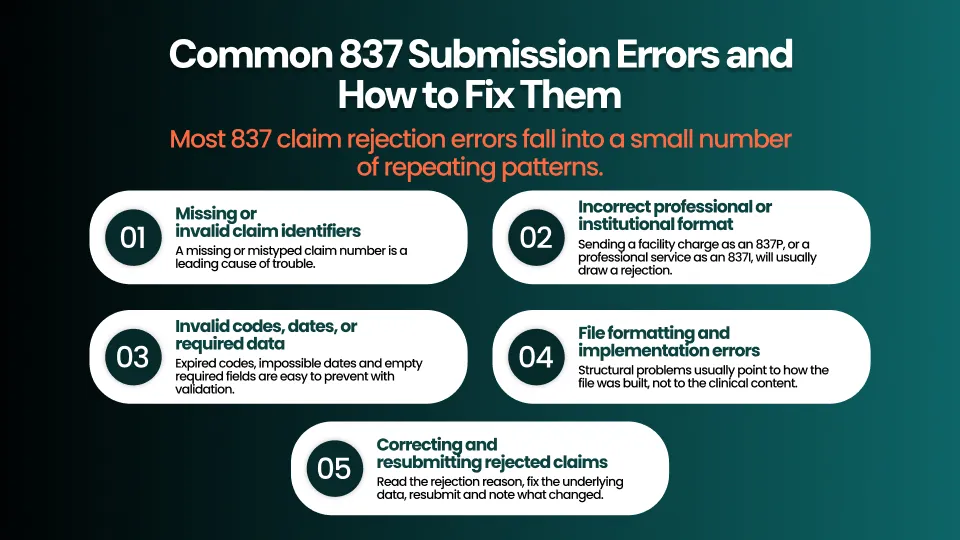
Most 837 claim rejection errors fall into a small number of repeating patterns.
Missing or invalid claim identifiers
A missing or mistyped claim number is a leading cause of trouble. Check it against the source document before submission and confirm it again if the claim comes back.
Incorrect professional or institutional format
Sending a facility charge as an 837P or a professional service as an 837I, will usually draw a rejection. Go back to the question of who is billing and resubmit in the right format.
Invalid codes, dates, or required data
Expired codes, impossible dates and empty required fields are easy to prevent with validation. Correct the data at the source rather than editing the file by hand.
File formatting and implementation errors
Structural problems usually point to how the file was built, not to the clinical content. If the same error repeats, contact your clearinghouse or software vendor.
Correcting and resubmitting rejected claims
Read the rejection reason, fix the underlying data, resubmit and note what changed. A written correction process, with a named owner, keeps rejected claims from piling up.
What Happens After an 837 Claim Is Submitted?
Submission is the beginning of the conversation, not the end. Several responses follow, and each one means something different.
Understanding 999 implementation acknowledgments
A 999 tells you whether the file was structurally readable. It is an implementation-level acknowledgment so it does not mean the claim was approved or will be paid.
Understanding 277CA claim acknowledgments and claim status
A 277CA reports whether individual claims were accepted or rejected at the front end of the payer or clearinghouse. Depending on the implementation, a related 277 can also report claim status. Confirm with your trading partner which responses you will actually receive.
Monitoring claim adjudication and payment
While the claim is being reviewed, keep an eye on timing. A claim that has no status after your usual window deserves a follow-up.
Reviewing 835 remittance advice
The 835 reports payment, adjustments and the reason codes behind them. In California workers’ comp, the electronic remittance can serve as the Explanation of Review for applicable electronic billing workflows, so read it carefully before you post and close the claim.
In short, a 277CA tells you where the claim stands, while an 835 tells you what was paid and why.
How Workers’ Compensation EDI Software Improves Billing Operations
Managing submission, rejections and payments across spreadsheets and portals works for a while, then breaks as volume grows. Workers’ comp EDI software keeps the whole lifecycle in one place.
Pre-submission claim validation
Validation catches bad codes, missing fields and format problems before a claim leaves your system, which prevents many rejections from ever happening.
Automated response and rejection tracking
Software can collect acknowledgments and status messages, link them to the original claim and flag the ones that need action. This is where medical billing EDI automation removes repetitive tracking work.
Claim follow-up and accounts receivable visibility
When every claim has a clear next step, managers can see what is waiting, what is stuck and what needs attention today.
Payment reconciliation and reporting
Matching each remittance to its claim makes underpayments easier to spot and reporting easier to trust.
Integrating EDI workflows with existing billing operations
Good tools fit around the way a team already works. BillGenix’s billing workflow management capabilities are built to connect EDI activity with the rest of the workers’ comp process. Before relying on any specific capability, confirm it against the current product pages or in a demo.
Frequently Asked Questions
What is the difference between 837P and 837I?
The 837P is the professional claim for services from physicians and clinicians. The 837I is the institutional claim for charges billed by hospitals and facilities.
Which 837 format is used for physician billing?
Physician billing uses the 837P, which corresponds to the CMS-1500 paper form.
Which electronic format is used for institutional claims?
Institutional claims use the 837I, which corresponds to the UB-04 paper form.
Is electronic workers’ compensation billing mandatory in California?
Claims administrators must accept electronic medical bills, but providers may choose electronic billing or compliant standardized paper billing. Providers who choose EDI must be able to receive electronic responses.
What information is needed to submit an 837 claim?
You need provider and billing details, the injured worker’s identifiers and claim number, dates of service, diagnosis and procedure codes and charges. Institutional claims also need facility-specific data such as the type of bill and revenue codes.
What does a 999 acknowledgment mean after claim submission?
It means the file was received and checked for structure. It does not confirm that any claim was approved or paid.
What is the difference between a 277CA and a 835?
A 277CA reports whether claims were accepted or rejected at the front end. An 835 reports payment and adjustments after the claim has been processed.
How can billing teams correct rejected 837 claims?
Read the rejection reason, fix the underlying data, resubmit in the correct format and track the correction. A documented process with a named owner keeps this consistent.
Can workers’ compensation billing software automate EDI workflows?
Yes, many tools can validate claims, track responses, route rejections and match remittances. Confirm exactly which steps a given product automates before you commit.
Simplify California Workers’ Compensation EDI With BillGenix
Accurate claim preparation and careful response tracking are what keep electronic billing running smoothly. Choosing the right 837 format, validating data before you submit and following each claim through to payment will prevent most avoidable delays.
BillGenix helps teams bring those steps together, with EDI activity connected to the rest of the workers’ comp workflow. If you would like to see how that works with your own process, Book a BillGenix Demo. You can also learn more about BillGenix and the platform behind it.