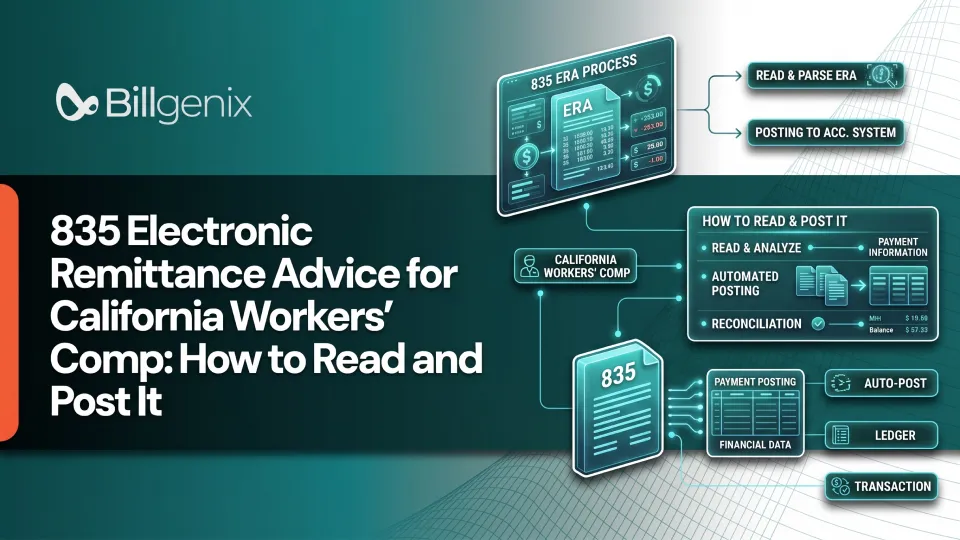
An 835 electronic remittance advice is the electronic file a payer sends after processing a claim to explain what it paid, what it adjusted and why. It is the digital version of the explanation that used to arrive on paper. In California, the Division of Workers' Compensation (DWC) identifies the X12 835 as the electronic format for payment remittance and California workers' compensation EOR (Explanation of Review) information, including the reasons for contested bill items.
Getting this file right matters. If your team misreads an adjustment or posts a payment to the wrong place, balances drift and unpaid money goes unnoticed. It also helps to remember that receiving remittance information is not the same as confirming that funds have reached your account.
This guide walks through what the 835 contains, how to read it, how to post it and how to handle bills that are denied or underpaid. By the end you should have a repeatable process for review, posting, investigation and documentation.
What Is 835 Electronic Remittance Advice?
If you are asking what is an 835 ERA, the short answer is this: it is a standardized X12 transaction, formally called the Health Care Claim Payment/Advice, that communicates payment and remittance details. A single 835 remittance advice can carry payment information, adjustment details or remittance information without a payment in that same transaction.
What information does an 835 contain?
An 835 typically identifies the payer and payee, reports claim-level payment details and lists adjustments at the claim or service-line level. It may also include provider-level adjustments. Which pieces appear depends on the payer, the implementation guide and the companion guide.
How an ERA differs from a paper Explanation of Review
A paper EOR and an electronic remittance carry related information in different formats. In California, the electronic route uses the 835 to deliver EOR content in a form that software can read and post. The substance, including the reasons items were adjusted or contested, still has to be understood by a person.
Why the 835 matters in workers' compensation billing
The 835 is where you find out what actually happened to your bill. It tells you how much was paid, what was reduced or denied, and what reasons were given. Without careful review, your team cannot post accurately or decide whether a bill needs follow-up.
California Workers' Comp 835 and Explanation of Review Requirements
For California workers' comp 835 transactions, California's DWC guidance is the starting point. It uses the 835 format for electronic EOR information and expects providers who choose electronic billing to be able to receive electronic responses, including remittance advice.
The relationship between the 835 and the EOR
The EOR is the explanation of how a bill was reviewed and paid. The 835 is one way that explanation is delivered electronically. Think of the EOR as the message and the 835 as one of the envelopes it can arrive in.
California DWC electronic billing guidance
The DWC publishes electronic billing FAQs and related materials. Use them to confirm what electronic billing requires of providers and what responses you should be ready to receive.
How to locate contested bill items and the stated reasons
Look at the claim-level and service-line adjustments in the 835. The adjustment codes tell you which items were reduced or denied and give the reason. Then compare them with the EOR content for the same bill.
Where to find applicable companion guides and regulations
Reference the current DWC Medical Billing and Payment Guide, the Electronic Medical Billing and Payment Companion Guide, and the applicable regulations. Always use the version that applies to your payer and your implementation. For help on the front end of the process, see our overview of California workers' comp billing requirements.
ERA, EOR, and EFT compared
Term | What it is | What it does for you |
ERA (835) | Electronic file explaining payment and adjustments | Tells you what was paid, adjusted, or denied, and why |
EOR | Explanation of how a bill was reviewed | Gives the reasons for payment decisions and contested items |
EFT | Electronic transfer of funds | Moves the money to your account |
An ERA and an EFT are related but separate. The ERA explains, and the EFT pays.
How to Read an 835 Remittance Advice File
A raw 835 can be hard to read, but the structure follows a logical order. Work through it the same way every time.
Identify the payer, payee, and payment information
Start with who sent the file, who it is addressed to, and what payment information it reports. This tells you which account the file belongs to.
Find the claim-level payment details
Next, look at each claim's billed amount, paid amount, and any claim-level adjustments. This is where you learn the overall outcome for the bill.
Review service-line adjustments
Claim-level adjustments apply to the claim as a whole. Service-line adjustments apply to one billed line. A claim can look fine overall while one line was reduced or denied, so check both.
Understand adjustment group codes, CARCs, and RARCs
These code sets explain why amounts changed. We cover them in detail below.
Match the remittance to the original claim and payment
Use your claim identifiers and the trace information in the file to tie the remittance to the original bill and to the payment you received.
Illustrative example. The figures below are fictional and do not represent an official California fee-schedule calculation.
Example field | Illustrative amount |
Original billed amount | $250.00 |
Payment reported for the claim | $180.00 |
Contractual or other adjustment | $50.00 |
Remaining amount requiring review | $20.00 |
The $20 balance must be investigated using the actual adjustment details, the applicable workers' compensation rules, and the payer's EOR. It should not be automatically written off or billed to the injured worker.
Important 835 Segments Billing Teams Should Understand
Segment interpretation depends on the applicable X12 implementation guide and the payer's companion guide. Not every segment appears in every transaction.
BPR: payment or remittance information
The BPR segment carries payment information such as the amount and method. It helps you understand the overall payment the file describes.
TRN: trace and payment matching information
The TRN segment holds trace information used to match the remittance to a payment. This is key when you reconcile an ERA against an EFT or check.
CLP: claim-level payment information
The CLP segment reports claim-level details such as the claim status and the amounts billed and paid.
CAS: claim and service adjustment information
The CAS segment reports adjustments, including the group code and reason code for each. This is where much of your investigation begins.
SVC: service-line information
The SVC segment describes an individual billed service and what was paid for it.
PLB: provider-level adjustments
The PLB segment reports adjustments that apply to the provider and not to a single claim. These can affect your total payment even though they do not belong to one bill.
Common Adjustment Codes on a Workers' Comp 835
Three code sets work together to explain an adjustment. Understanding claim adjustment group codes, CARC codes and RARC codes is essential for accurate posting.
What claim adjustment group codes mean
A group code gives the broad category of an adjustment. It helps you see in general terms whose responsibility an adjusted amount falls under. Always read it together with the reason code.
How Claim Adjustment Reason Codes (CARCs) explain adjustments
A CARC explains why a claim or service line was adjusted. Verify the description in the official code set before acting.
How Remittance Advice Remark Codes (RARCs) add context
A RARC adds further explanation or instruction. Read it alongside the adjustment it accompanies.
How to verify code descriptions before acting
Never rely on memory or on a code's reputation. Look up the current description, then compare it with the EOR. California's companion guide references the standard group, reason and remark code sets and includes a crosswalk between DWC bill-adjustment reasons and electronic adjustment codes.
Code set | What it communicates | What the biller should do |
Claim Adjustment Group Code | Broad category of a claim adjustment | Review the category and the related reason code |
CARC | Reason a claim or service line was adjusted | Verify the code description and compare it with the EOR |
RARC | Additional explanation or instruction | Read it alongside the associated adjustment |
DWC-specific adjustment guidance | California-specific context where applicable | Consult the current DWC guide and the relevant crosswalk |
No code should be treated as a universal California workers' compensation rule.
How to Post an 835 ERA in a Medical Billing System
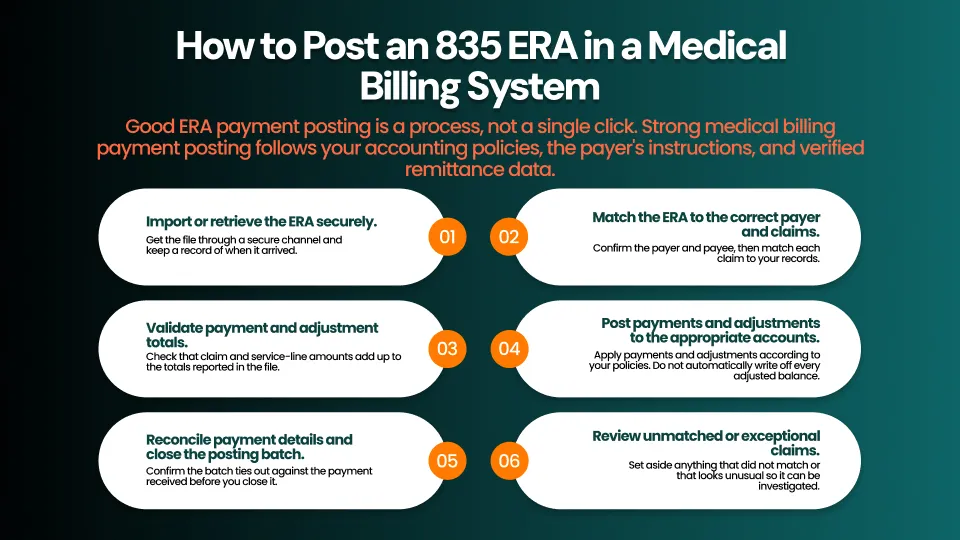
Good ERA payment posting is a process, not a single click. Strong medical billing payment posting follows your accounting policies, the payer's instructions and verified remittance data.
- Import or retrieve the ERA securely. Get the file through a secure channel and keep a record of when it arrived.
- Match the ERA to the correct payer and claims. Confirm the payer and payee, then match each claim to your records. This is also the point to confirm the claim moved through electronic claim submission correctly in the first place.
- Validate payment and adjustment totals. Check that claim and service-line amounts add up to the totals reported in the file.
- Post payments and adjustments to the appropriate accounts. Apply payments and adjustments according to your policies. Do not automatically write off every adjusted balance.
- Review unmatched or exceptional claims. Set aside anything that did not match or that looks unusual so it can be investigated.
- Reconcile payment details and close the posting batch. Confirm the batch ties out against the payment received before you close it.
How to Reconcile 835 Payments and Identify Discrepancies
Accurate payment reconciliation is where posting becomes reliable. It is also where you find underpaid medical claims and denied workers' comp bills before they age out of reach.
Compare billed, adjusted, and paid amounts
For each claim, compare the billed amount, the adjustments, and the amount paid. Any remaining balance needs a reason.
Match EFT or check information where applicable
Use the trace and payment information to match the ERA to the actual funds received. Because the 835 and the EFT are distinct, a matching ERA does not prove the money arrived.
Investigate duplicate, missing, or unmatched remittances
Watch for a remittance with no payment, a payment with no remittance, or the same remittance appearing twice. Each one needs to be traced.
Track underpayments, denials, and unresolved balances
Keep a running list of claims that were underpaid, denied, or left with a balance. Include the date you identified each one.
Document the reason and next action for each exception
For every exception, write down why it happened and what you will do next. This turns scattered notes into a workable follow-up queue.
What to Do When a California Workers' Comp Bill Is Underpaid or Disputed
When a bill is underpaid or contested, work through a consistent review.
Review the EOR and the specific contested items
Identify exactly which items were reduced or denied and what reasons were given. Be specific about line items, not just the claim.
Compare the adjustment with the applicable billing rules and fee schedule
Check whether the adjustment fits the applicable billing rules and fee schedule. Do not assume the payer is right or wrong until you have compared them.
Collect supporting documentation
Gather the documentation that supports your billing, such as records and any correspondence tied to the bill.
Determine whether correction, clarification, or reconsideration is appropriate
Sometimes a bill needs a correction on your side. Sometimes it needs a clarification from the payer. Sometimes a formal request for review is the right path. California DWC guidance provides for a second review when a provider disputes the amount paid, and the DWC's FAQ states a 90-day period from service of the EOR for submitting that request. Verify the current requirements and the applicable rules before you act, since deadlines are easy to miss and rules can change.
Track the request and response
Record when you made the request, to whom, and what response you received. Add a follow-up date so the item does not stall.
Best Practices for Efficient ERA Payment Posting
Review remittance files regularly
Check for new files on a set schedule. Regular review keeps small problems from becoming large backlogs.
Standardize payment-posting and exception-handling procedures
Write down how your team posts payments and handles exceptions. Consistent steps reduce errors and make training easier.
Keep an audit trail of manual corrections
When someone corrects a posting by hand, record who did it, when, and why. That history protects your team during reviews.
Monitor unapplied cash and outstanding balances
Unapplied cash and open balances show where posting has fallen behind. Review them often.
Use reporting to identify recurring adjustment patterns
If the same adjustment keeps appearing, the cause is often upstream in billing or documentation. Reporting helps you find it and fix it once. These habits also tie into your wider billing cycle, from claim acknowledgment and rejection tracking to the 999 implementation acknowledgment that comes before it.
How Workers' Comp Billing Software Can Support ERA Workflows
Manual posting works at low volume, but it becomes hard to sustain as claims grow. The right workers' comp billing software features can make remittance work easier to organize. If your goal is to automate payment posting, start with the tasks your team repeats most.
Organize remittance and claim information
Keeping remittance details next to claim information saves staff from switching between systems to understand a bill.
Reduce repetitive manual posting tasks where supported
Software can take on repetitive matching and entry work where the capability is supported, which frees your team for the exceptions that need judgment.
Flag exceptions for review
A clear way to surface unmatched claims and unusual adjustments helps staff spend time where it matters.
Improve visibility into outstanding balances and follow-ups
When balances and follow-up dates are visible in one place, managers can see what is stalled and assign it. Good workers' compensation billing software supports your process but does not replace careful review.
Frequently Asked Questions
What is an 835 electronic remittance advice?
It is an electronic X12 file that explains what a payer paid, adjusted, or denied on a claim, and why. It can also carry remittance information without a payment in the same transaction.
Is an 835 the same as an Explanation of Review?
Not exactly. The EOR is the explanation of how a bill was reviewed and paid. In California, the 835 is the electronic format used to deliver that EOR information.
What is the difference between an 835 and an EFT?
The 835 explains the payment and any adjustments. The EFT is the electronic transfer of the funds. They are matched using trace and payment information when available.
What are CARC and RARC codes?
A CARC explains why a claim or service line was adjusted. A RARC adds extra explanation or instruction. Both should be read with the group code and verified against the official code sets.
Does an 835 always mean payment has been sent?
No. An 835 can report payment details, adjustments, or remittance information without a payment in that transaction, and receiving it does not confirm that funds have reached you.
How do I post an 835 in medical billing software?
Import the file securely, match it to the correct payer and claims, validate totals, post payments and adjustments, review exceptions, and reconcile before closing the batch.
What should I do if an 835 shows an underpayment?
Review the EOR and the contested items, compare the adjustment with the applicable billing rules and fee schedule, gather documentation, and decide whether correction, clarification, or reconsideration is appropriate.
How long do California workers' comp providers have to request a second review?
The DWC's FAQ states a 90-day period from service of the EOR for submitting a second review request. Confirm the current requirements and applicable rules before acting.
Make Workers' Comp Payment Posting Easier to Manage
Improve visibility into workers' compensation billing workflows, payment reconciliation, and outstanding follow-ups. Explore how BillGenix can support your team's billing operations.